

Alloy Codeless SDK
Below is a visual representation of the Alloy Codeless SDK integration.
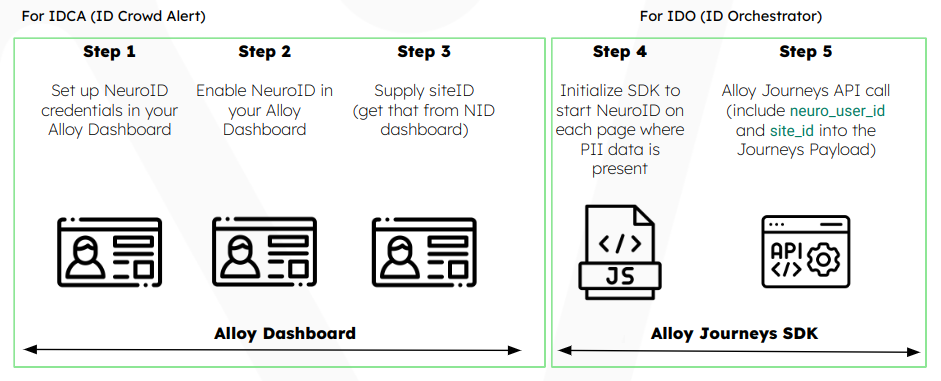
Frontend installation steps (IDCA)
- Set up NeuroID credentials in your Alloy Dashboard
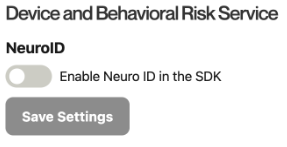
- Enable NeuroID in your Alloy Dashboard
Navigate to Settings > SDK page on your Alloy Dashboard
- Supply
site_id
Site Id
A NeuroId
siteIdis used to uniquely identify the Application form for which behavior data is collected.
The format begins withform_followed by five characters and three numbers, e.g.: form_abcde123
For more detailed information how to enable NeuroID with Alloy Codeless SDK, please follow Alloy integration guide.
Backend API integration (IDO)
- To start using the NeuroID signal for real time decisions in Alloy, you need to include two additional values (
site_idandneuro_user_id) in your Alloy API call.
| Alloy Parameter | NeuroID Value | Description |
|---|---|---|
neuro_user_id | identityId | The identityId is automatically generated when Alloy Codeless SDK is initialized.Client needs to store identityIdidentifier and map it to it's internal UUID. |
site_id | siteId | The Site Id for your application can be found in the NeuroID JavaScript code snippet. For Mobile SDK installations siteId will be provided by NeuroID.The siteId is unique for each Application. |
Updated over 2 years ago