

NeuroID Direct JS integration with Alloy API
Below is a visual representation of the NeuroID JS and Alloy Evaluation API integration.
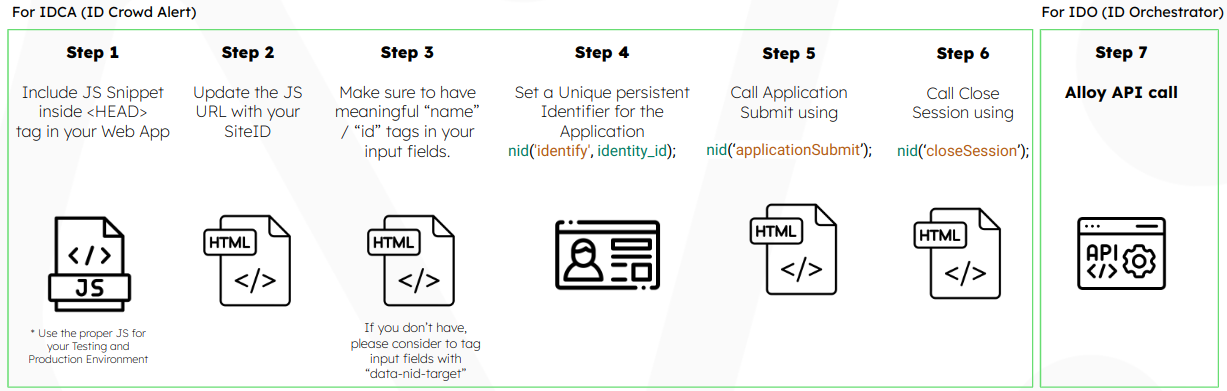
NeuroID JavaScript Library Installation Steps
Frontend integration (IDCA)
- To integrate NeuroID JS into your Web application follow Web installation guide.
Backend integration (IDO)
- To start using the NeuroID signal for real time decisions in Alloy, you need to include two additional values (
site_idandneuro_user_id) in your Alloy API call.
| Alloy Parameter | NeuroID Value | Description |
|---|---|---|
neuro_user_id | identityId | UseidentityId identifier that you set, using NID JS command. |
site_id | siteId | The Site Id for your application can be found in the NeuroID JavaScript code snippet. For Mobile SDK installations siteId will be provided by NeuroID.The siteId is unique for each Application. |
Finding your Site Id
Your JavaScript snippet URL will look similar to
//scripts.neuro-id.com/c/nid-abcde123.js.The
siteIdfor this example would beform_abcde123.
ThesiteIdfor Mobile SDK installations for example would beform_abcde123, and will be provided by NeuroID.
Please refer to the documentation for more information regarding Alloy Evaluations API or Alloy Journeys API integration.
Updated over 2 years ago